
A PRISMA 2020 flow diagram records how your systematic review moves from search results to included evidence. You’ll need a search and screening log that shows every removal, retrieval attempt and eligibility decision before you can fill its boxes accurately to get a finished diagram.
Why journals ask for the diagram
The PRISMA flow diagram makes your evidence-selection process visible so readers can trace the studies you included back to the search results. They need that route as well as the final selection. Match the figure’s counts to your screening records, methods and results, because a mismatch leaves readers guessing which account is correct.
PRISMA guides reporting rather than the conduct of a review. You can’t infer an adequate search or sound conclusions from a completed figure, as the PRISMA statement explains. The boxes document decisions; they don’t validate them.
You can use the AnswerThis PRISMA 2020 checklist checker to compare manuscript text with the checklist and locate passages addressing its requirements. Read those passages alongside your supplements and the official guidance before deciding that an item is covered. Treat the checker as reporting assistance. It can’t certify the review.
The four PRISMA 2020 templates
Choose your PRISMA 2020 template according to whether the review is new or updated and which sources you searched. Make those decisions before entering counts, because they determine the branches you’ll need. The UNC Health Sciences Library guide sets out four combinations:
- New review using databases and registers.
- New review using databases, registers and other sources.
- Updated review using databases and registers.
- Updated review using databases, registers and other sources.
If reference lists or organizational websites helped you identify reports, include the other-sources branch. Reconstructing those counts can take work. Don’t leave out a source just because the databases branch is easier to fill.
An updated review carries forward evidence from an earlier review and distinguishes it from evidence located in the update. Running your search again before submitting a new review doesn’t change its type.
Keep separate source counts in the working log after choosing the template. Even if the figure combines them, you’ll need those original totals to check the arithmetic and explain where the records came from. Reconcile your own totals before drawing the figure, which accompanies the 27-item PRISMA 2020 checklist.
Box by box: a worked PRISMA flow diagram example
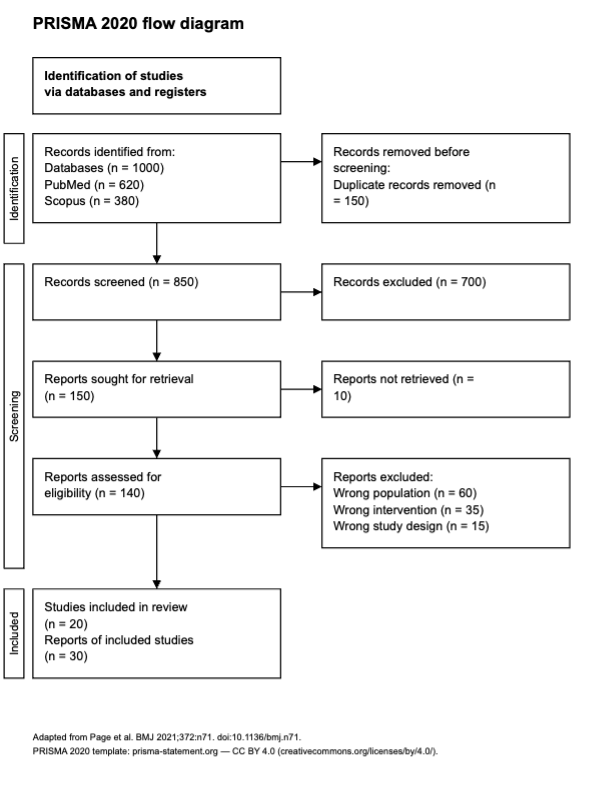
A worked PRISMA flow diagram example follows the same evidence through identification, screening, retrieval and eligibility assessment. Here, you’re reviewing discharge education for adults leaving hospital. Every count in this imaginary review is a teaching example, not a result from an actual review. Your own figure needs your own documented decisions.
Check the UNC step-by-step guidance as you prepare the diagram. Don’t transfer these numbers into it.
Records identified
Begin with the original search returns: Suppose PubMed gives you 620 records and Scopus gives you 380 records. Add them before removing duplicates:
620 + 380 = 1,000 records identified.
There aren’t any register searches or other sources in this example. Preserve the result count from each search, because an imported library may already have removed duplicates and show a smaller total. That library count can’t replace the original search return.
Records removed before screening
The 1,000 identified records can include repeated entries for the same report. Suppose you remove 150 duplicate records. Automation removes none, and there aren’t any removals for other reasons, so enter 0 in each of those boxes:
1,000 − 150 = 850 records to screen.
Deduplication deals with repeated entries. You haven’t yet decided whether the reports meet your eligibility criteria, so keep that decision separate from duplicate removal.
Records screened and records excluded
Screen the remaining 850 records using their titles and abstracts. In the example, suppose 700 fail your criteria. A record concerning paediatric discharge would fall outside the adult population you’ve specified.
Retain each screening decision in the log so you can explain the total later. The figure gives readers the count, while the individual decisions show how you reached it.
Reports sought for retrieval
After title-and-abstract screening, 150 records remain for further assessment. You’re now trying to obtain the documents those entries describe. In this example, they correspond to 150 reports sought for retrieval:
850 − 700 = 150 reports sought for retrieval.
Include unsuccessful attempts in the sought total. Your PDF folder won’t show them, which is why you need a retrieval outcome recorded against every report you tried to obtain.
Reports not retrieved
Suppose you can’t obtain 10 of the 150 reports sought, so put 10 in the reports-not-retrieved box. Their eligibility remains unassessed because you couldn’t read the reports.
Keep these retrieval failures out of the full-text exclusion total. Where appropriate, pursue library access, an interlibrary loan or an author request. Record what happened, including attempts that didn’t produce the document.
Reports assessed for eligibility
Subtract the 10 unavailable reports from the 150 sought, leaving 140 obtained reports for full-text eligibility assessment:
150 sought − 10 not retrieved = 140 reports assessed.
Your log needs to show that you’ve actually assessed each report. Downloading it doesn’t establish that, and reading an abstract alone doesn’t count as assessing the full report.
Reports excluded, with reasons
Full-text assessment provides the detail you need to apply the eligibility criteria. In this imaginary review, an ineligible population accounts for 60 exclusions. Another 35 reports fail the intervention criterion, while an ineligible study design explains the remaining 15:
60 + 35 + 15 = 110 reports excluded.
Give each excluded report one primary reason, even if it fails several criteria. Otherwise, you’ll count the same report repeatedly and inflate the total. Agree on the order for assigning reasons so the team handles overlapping failures consistently.
Studies included and reports of included studies
Subtract the 110 excluded reports from the 140 assessed reports to find how many contribute to the review:
140 − 110 = 30 reports of included studies.
Suppose those 30 reports describe 20 distinct studies. Your final boxes should therefore show 20 studies included and 30 reports of included studies.
Different totals are expected when a study has multiple reports. Keep a mapping from each report to its underlying study so readers can trace all 30 documents to the 20 investigations. Don’t make them reconstruct that relationship from author names alone.
A separate example: overlap between search sources
When your review includes other sources, check for shared reports before combining the branches. The discharge-education example uses only databases. The following calculation is a separate hypothetical example and mustn’t be added to its counts.
Imagine that the databases-and-registers branch yields 30 included reports and the other-sources branch yields 8. You’ve identified 3 reports appearing in both:
30 + 8 − 3 = 35 unique reports.
Resolve that overlap before combining the totals. The calculation gives you reports. You’ll still need the report-to-study mapping to establish how many studies they represent.
Records, reports and studies: keep the units separate
PRISMA counts distinguish records, reports and studies because they describe different parts of the evidence trail. The PRISMA glossary defines a record as a database or website entry containing a report’s title, abstract or both. A report is the document describing research. The study is the investigation behind it.
Indexing the same article in different databases creates duplicate records. A trial’s main results paper and its follow-up paper, however, are separate reports belonging to the same study. You shouldn’t discard the follow-up simply because the participants or authors look familiar. It may supply outcomes or methods you need.
Compare trial identifiers when linking reports. Recruitment settings and participant descriptions can help you check the match, together with intervention and author details. If the relationship remains uncertain, flag it for the team rather than quietly merging the documents.
That distinction explains why the example changes units as it progresses. Deduplication acts on records, while the final mapping connects included reports to studies.
Recording reasons for full-text exclusion
Give every full-text exclusion a reason tied to an established eligibility criterion. Agree on the order for applying reasons before assessment starts, so a report failing several criteria receives a consistent primary reason. The UNC guide advises counting each excluded report once in the reasons list.
Specify an ineligible population, intervention or study design instead of writing “not relevant.” That label doesn’t tell a reader which criterion failed. Nor should you invent a new criterion after reading a report that doesn’t fit your expectations.
Take particular care with outcome-based exclusions. Your eligibility criteria must justify the decision. A result that’s difficult to extract doesn’t, by itself, make the report ineligible.
Retain the citation with the decision, reason and supporting notes. The diagram combines reasons into categories, so consider a supplementary list explaining exclusions of studies that appear eligible, as recommended by the PRISMA statement. Readers can then inspect the reasoning behind the grouped counts.
Scoping reviews and PRISMA-ScR
Scoping reviews use PRISMA-ScR to report their work, including how they selected evidence. Although the example above concerns a systematic review, you still need a traceable selection process for a scoping review. Its reporting extension contains 20 core and 2 optional items.
Adjust the diagram’s labels to the material you’ve included. “Sources of evidence” may describe guidance and policy documents more accurately than “studies.”
Keep the identification, screening, retrieval and eligibility trail intact. A broad question doesn’t excuse an unexplained selection process. If you’re uncertain which review type suits the project, speak with your supervisor or a health sciences librarian before committing to a reporting framework.
Reporting AI-assisted screening
Report what screening software did and how people made and checked eligibility decisions. The diagram shows the evidence’s route, while the methods explain who or what shaped it. Follow PRISMA’s selection-method guidance for automation, reviewer participation and independence.
Ranking records for a reviewer doesn’t necessarily exclude any of them. But if automation removes records before screening, count those removals in the appropriate box and describe the process that produced them.
You can adapt the wording below to your actual workflow. It’s a suggested template, not an official PRISMA requirement:
We used [tool and available version or model identifier] for [specific task] with [input material]. [Reviewer roles and independence] made the eligibility decisions. We checked tool outputs through [validation and human-review procedure] and resolved disagreements through [process]. Relevant settings, prompts and decision records are available in [location].
Explain corrections and amendments to the plan so readers can follow what changed. Disclose relevant AI assistance with extraction or manuscript preparation according to your institution’s and journal’s rules. Before uploading unpublished or sensitive material, check that you have permission.
An AI tool can’t guarantee correct PRISMA reporting. Assess its fit for the task and whether it records decisions, provides useful exports and permits human oversight. Check data handling too. A PRISMA label alone doesn’t establish that the workflow has been evaluated for your intended use.
Free tools that draw the diagram
Drawing tools turn checked counts into a figure, but they can’t reconstruct missing screening decisions. Once the totals reconcile and the methods explain how you reached them, choose the appropriate template and inspect the exported diagram.
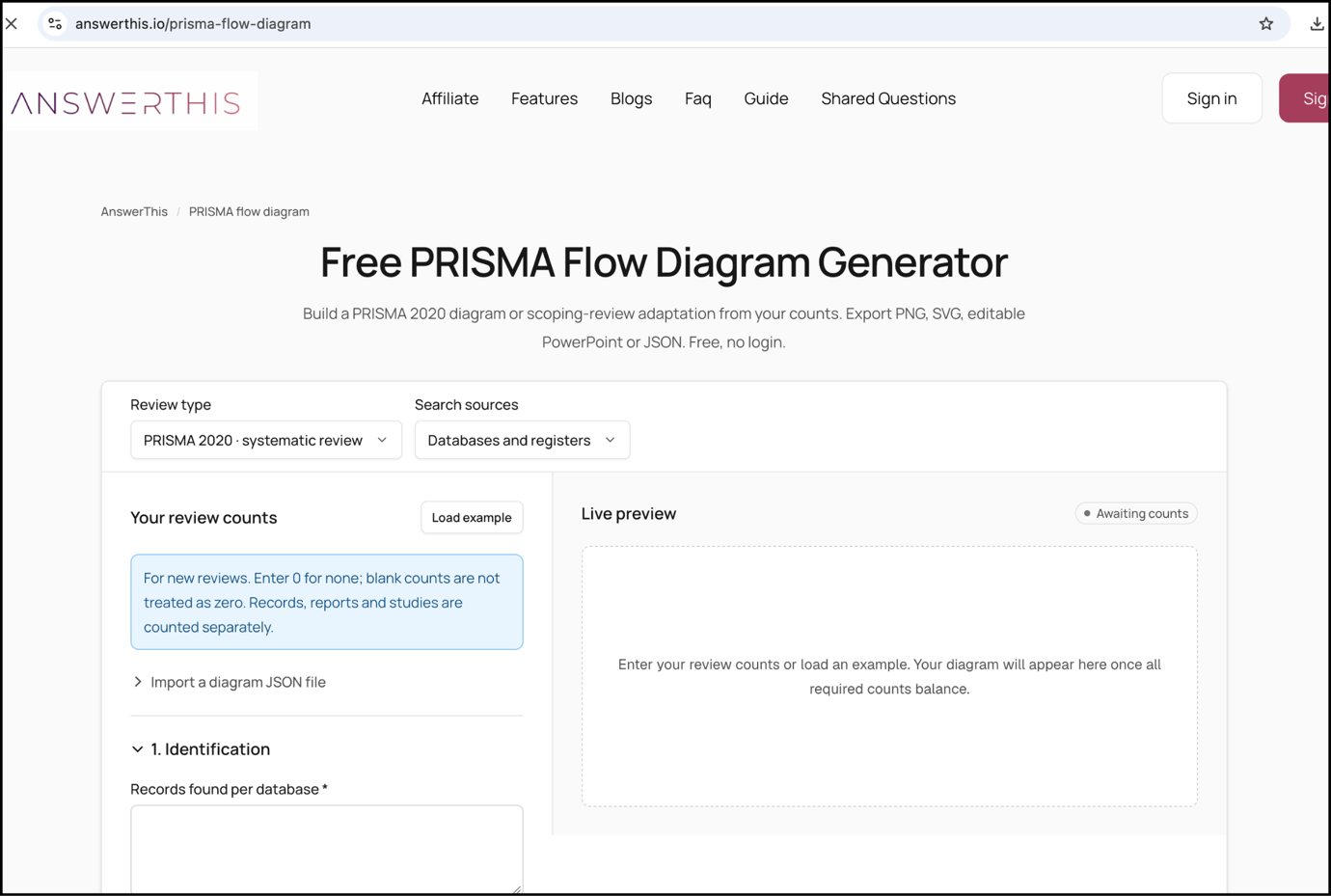
The AnswerThis PRISMA flow diagram generator and the PRISMA2020 Shiny app offer free ways to draw figures from counts you’ve supplied. The PRISMA2020 R package and Shiny app also produce PRISMA flow diagrams. You can work in the browser app without using R. For editable official templates, consult the UNC guide as well.
AnswerThis supports new-review diagrams, including an optional other-sources branch. The generator page lists PNG, SVG, editable PowerPoint and JSON exports, so choose the format that suits your next task. SVG gives you vector artwork, while PowerPoint preserves editable boxes, arrows and text. You can restore saved counts with JSON.
Compare tools according to the template you need, the editing and export options, and their data handling. Read the export from the first box to the last, checking every count against the log. Inspect the labels and readability, then check attribution. A finished diagram should faithfully report your decisions, even when filling its boxes has exposed something you need to revisit. Producing the artwork doesn’t validate the eligibility decisions behind it.
FAQs
What is a PRISMA 2020 flow diagram?
A PRISMA 2020 flow diagram documents the route from identified evidence to included studies and reports. It accounts for removals, unsuccessful retrievals and full-text exclusions with reasons. Alongside the 27-item reporting checklist, it lets readers check selection against your methods and results.
What is the difference between records and reports in PRISMA 2020?
A record describes a report in a database or website entry, while the report is the research document itself. The PRISMA glossary separates both from the underlying study. You can’t count them interchangeably: duplicate entries may describe one report, and separate reports may belong to one investigation.
Do scoping reviews use the PRISMA flow diagram?
Yes, scoping reviews can use an adapted flow diagram to document identification, screening, eligibility assessment and inclusion. Choose labels that describe your sources of evidence and follow PRISMA-ScR. Don’t treat the figure as the complete reporting package, because the extension has other requirements to address.
Author bio: Dr. Rajni Garg is Executive Lead, Research & Content Strategy, in the Research & Development Department at AnswerThis, a research platform for students and researchers.